Case study 02 · Concept · Product design · Workflow · AI direction
One tool for the person who specifies and the person who builds.
Built inside Intel's validation labs, unasked, for the engineers and technicians who use it every day. See the missing tool, build the missing tool.
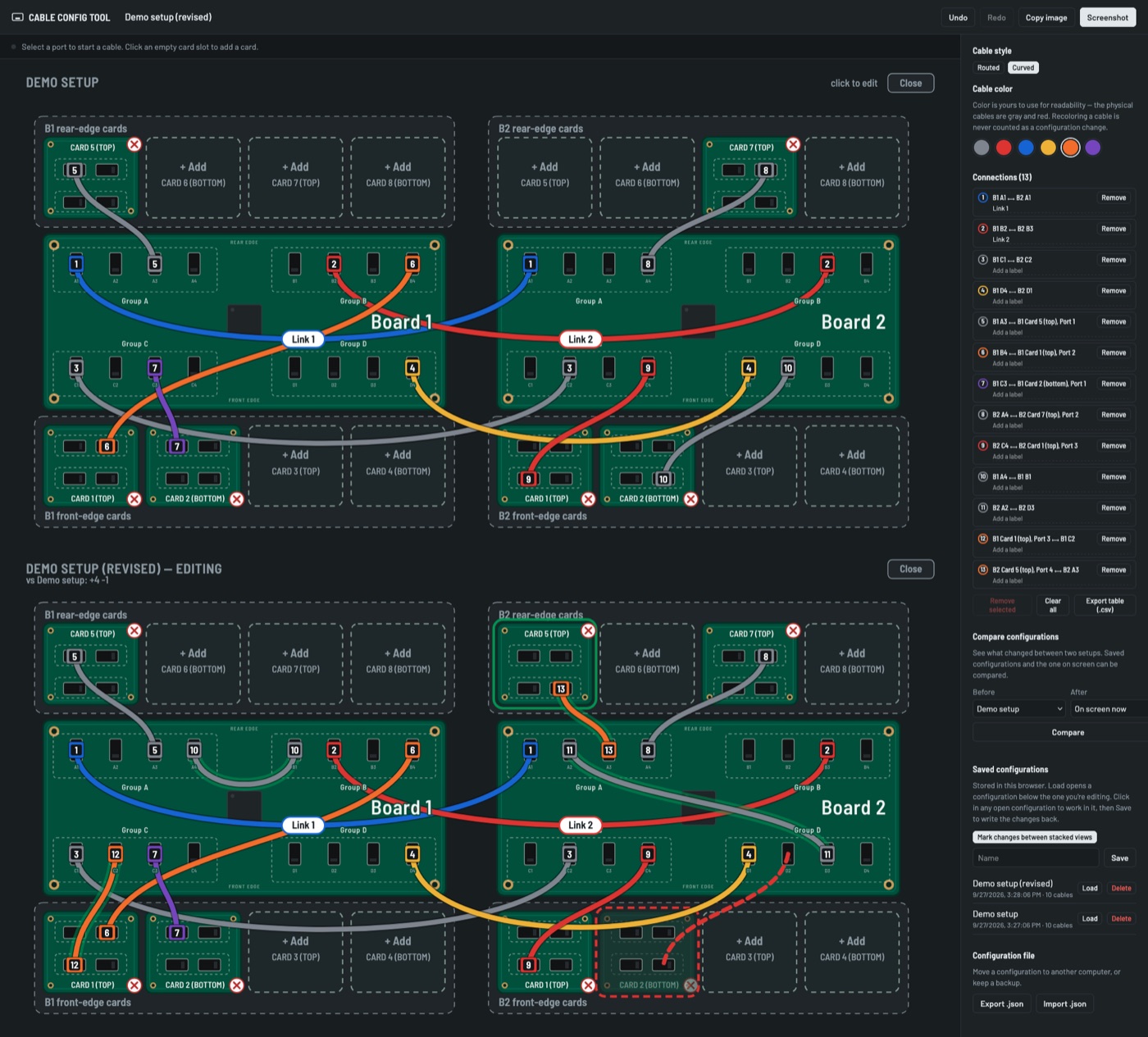
The drawing nobody could read. To specify a cable configuration, engineers took a screenshot of a board schematic that was hard to read to begin with, opened it in MS Paint and drew the cables on by hand. I was leading the technicians who had to wire from those drawings — every configuration started with working out someone else's hand-drawn lines on an image you could barely read.
So I designed one tool both sides use. Engineers build a configuration in a few clicks, save it, and start the next one from an old one instead of a fresh screenshot. Technicians get a clean diagram and a numbered connection list instead of a drawing to decode. A compare view shows exactly what changed between two setups. By my conservative estimate it saves the lab 20 to 30 minutes per configuration, and it's in use on both sides, slated for future project roadmaps.
This one was built the way the products were: I set the concept and the design rules, and directed AI to build it. The live demo runs on generic boards.